For hotels, the gap between showing up in a Google search and actually converting that visibility into a booking often comes down to a single, underused feature. Hotel Google Business Profile booking optimization isn’t just about appearing in local search results, it’s about removing every unnecessary click between a traveler discovering your property and completing a reservation.
This guide covers exactly how Kerala hotel owners and managers can approach hotel Google Business Profile booking optimization step by step, from claiming and completing your listing to configuring a direct booking link that actually converts, reducing dependency on commission-heavy OTA platforms along the way.
GBP Optimization for Hotels: Where to Start
Effective GBP optimization for hotels begins with the fundamentals most properties overlook: a fully completed profile with accurate categories, complete amenities lists, correct contact information, and high-quality photos across every room type and common area. Incomplete profiles signal lower credibility to both Google’s algorithm and potential guests comparing options.
Beyond the basics, hotels specifically benefit from using Google’s hotel-specific attributes, star rating, price range, and amenity tags, since these help your listing surface correctly when travelers filter search results by specific criteria like free breakfast or pool access.
Hotel Google Listing Bookings: Adding a Direct Booking Link
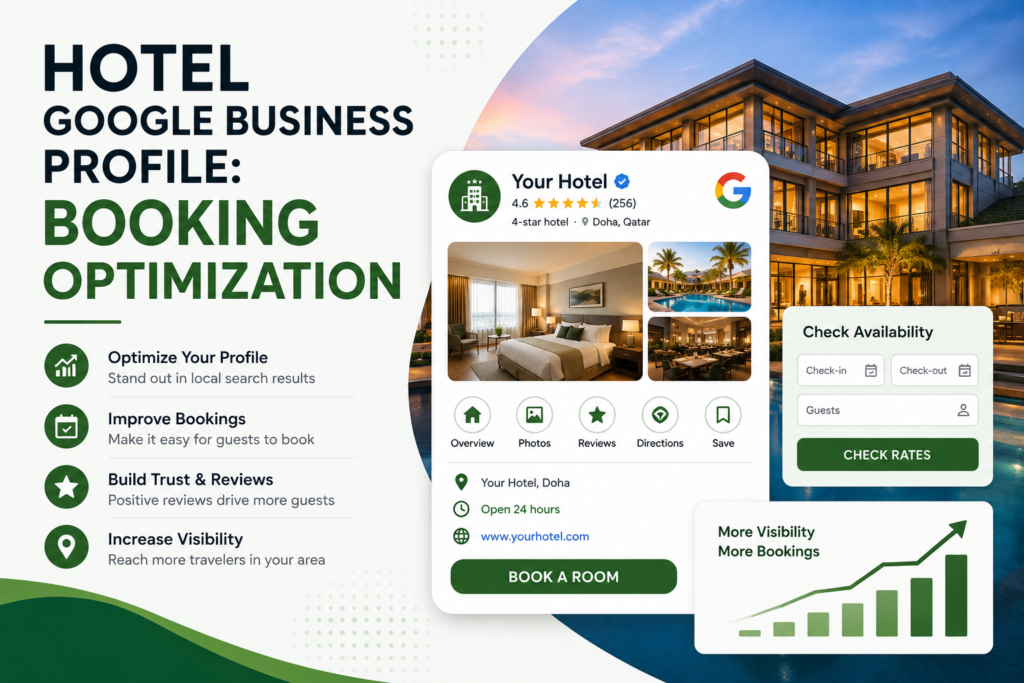
Understanding how hotel Google listing bookings actually work starts with the booking link feature itself. Within your Google Business Profile dashboard, hotels can add a direct booking URL, either by connecting to a Reserve with Google-approved partner for an automatic blue “Book” button, or by manually pasting a link to your own booking engine, which appears as a standard clickable link on both Search and Maps.
The critical detail many hotels get wrong is linking to their general homepage rather than the direct booking page itself. Every extra click a guest has to make to find your booking form reduces the odds they’ll actually complete the reservation, so the link should drop travelers directly onto a page where they can immediately select dates and see availability.
How to Optimize Hotel GBP: A Step-by-Step Approach
Learning how to optimize hotel GBP listings effectively involves several concrete steps:
- Claim and verify your listing at business.google.com if you haven’t already
- Add your direct booking URL through the Bookings section, using your booking page, not your homepage
- Complete every available attribute, including amenities, accessibility features, and hotel class
- Upload high-quality, current photos across rooms, common areas, and exterior views
- Respond to every review, both positive and negative, professionally and promptly
Working through this list methodically, rather than completing it partially and moving on, gives your listing the strongest possible foundation before focusing on ongoing optimization.
Google Business Profile Hotel Bookings: Reserve with Google vs Manual Links
Understanding the distinction in Google Business Profile hotel bookings setup matters for choosing the right approach. Reserve with Google requires connecting through a Google-approved third-party booking provider, which generates a prominent blue call-to-action button directly on your listing. A manually added link works with any booking system you already use, but doesn’t produce the same blue CTA button, appearing instead as a standard link.
Both methods can technically be used simultaneously, and after saving your booking URL, Google typically reviews and activates it within 24 to 48 hours, though Reserve with Google integrations can take up to a week to appear after connecting accounts.
Hotel Local SEO Google: Beyond Just the Booking Link
Hotel local SEO Google rankings depend on factors extending well beyond the booking feature itself. Consistent NAP (name, address, phone) information across all directories, genuine local citations, and location-specific content on your actual website all contribute to how well your hotel ranks in Google’s local results for searches like “hotels near [Kerala location].”
Applying the same technical fundamentals covered in our complete on-page SEO checklist to your hotel’s own website reinforces the local SEO signals your Google Business Profile alone can’t fully carry. Combining these on-page fundamentals with a broader local SEO strategy for Kochi-based businesses gives your hotel a more complete local visibility approach than optimizing your Google listing in isolation.
Increase Hotel Bookings Google: Removing Friction From the Journey
The core principle behind efforts to increase hotel bookings Google searches generate is friction reduction. A traveler who finds your hotel, sees strong photos and reviews, and clicks a booking link that drops them directly onto an available-dates screen is far more likely to complete a reservation than one forced to navigate a homepage, find a “Book Now” button buried in a menu, and then search for availability manually.
Every additional step between discovery and completed booking measurably reduces conversion, making this friction-reduction principle the single highest-leverage optimization most hotels can make to their profile.
Google Business Profile Hospitality: What Makes Hotels Different
Google Business Profile hospitality features differ meaningfully from those available to other business categories. Hotels can display star ratings, price ranges, and hospitality-specific amenities that service businesses like salons or clinics don’t have access to, giving properties a genuine opportunity to differentiate visually within search and Maps results if these attributes are properly completed.
Neglecting these hospitality-specific fields means your listing defaults to a more generic appearance, competing less effectively against properties that have taken the time to fully populate every available category-specific option.
Hotel GBP Photos and Reviews: The Trust-Building Combination
Strong hotel GBP photos and reviews work together to build the trust travelers need before committing to a booking, particularly for guests unfamiliar with your specific property or area. Photos should be genuinely current, professionally lit where possible, and cover the full guest experience, rooms, bathrooms, common areas, dining, and exterior, rather than a handful of outdated marketing shots.
Actively encouraging satisfied guests to leave reviews, and responding to every review professionally regardless of sentiment, signals both to Google’s ranking algorithm and to prospective guests that your property is actively managed and genuinely cares about the guest experience.
Hotel Google Maps Ranking: What Actually Moves the Needle
Improving hotel Google Maps ranking depends on a combination of relevance, distance, and prominence, the same three factors Google uses across all local business categories. For hotels specifically, prominence is heavily influenced by review volume and recency, photo quality and quantity, and how completely your profile’s hospitality-specific attributes are filled out.
Hotels that treat their Google Business Profile as a living, regularly updated asset, adding seasonal photos, posting updates, and consistently gathering fresh reviews, generally outperform competitors who set up their listing once and never revisit it.
Direct Bookings Google Business Profile: Reducing OTA Dependency
For hotels looking to reduce commission costs paid to online travel agencies, direct bookings Google Business Profile features offer a genuine path forward. Every booking captured directly through your Google listing, rather than routed through a third-party OTA, represents meaningful savings on commission fees that otherwise eat into your margin on every reservation.
Properties that actively promote their direct booking link, and ensure it leads to a genuinely competitive rate compared to OTA listings, can meaningfully shift booking mix over time toward these lower-cost direct channels.
Frequently Asked Questions
1. How long does it take for a booking link to appear on my Google Business Profile after adding it? Manually added links typically activate within 24 to 48 hours, while Reserve with Google integrations through a booking partner can take up to a week to appear after connecting accounts.
2. Should my booking link go to my homepage or a specific booking page? Always link directly to your booking page where guests can immediately see availability and select dates, since routing to a homepage adds unnecessary friction that reduces conversion.
3. What’s the difference between Reserve with Google and a manual booking link? Reserve with Google requires an approved third-party partner and generates a prominent blue “Book” button, while a manual link works with any booking system but appears as a standard link without the same visual prominence.
4. Do hotel-specific attributes on Google Business Profile actually affect rankings? Yes, completing hospitality-specific fields like star rating, price range, and amenities helps your listing surface correctly when travelers filter search results by specific criteria, directly affecting visibility.
5. Can improving my Google Business Profile really reduce OTA commission costs? Yes, every booking captured through your direct booking link rather than an OTA represents savings on commission fees, making sustained GBP optimization a genuine cost-reduction strategy over time.
Final Thoughts on Hotel Google Business Profile Booking Optimization
Effective hotel Google Business Profile booking optimization comes down to combining a fully completed listing, a properly configured direct booking link, and consistent attention to photos and reviews, all working together to remove friction between discovery and completed reservation. Kerala hotel owners who treat their profile as an actively managed asset, rather than a one-time setup task, position their property to capture more direct bookings and reduce reliance on costly third-party platforms.
Sanal Edison – SEO Expert Kerala 35/2262, Kattiparambil House, Church Road, Palarivattom, Kochi – 682025 Phone: +91 8590595811 | Email: sanal@teknoppy.com