Why Your Website Is Not Ranking
You have written good content. You have shared it on social media. But your website is still not showing up on Google. Sound familiar?
The problem is likely not what you are writing. It is what is happening underneath the surface of your site. Hidden technical issues quietly block search engines from crawling, understanding, and ranking your pages — no matter how good your content is.
A complete technical SEO audit checklist gives you a systematic way to find and fix all those issues in one go. Whether you are a small business owner in Kochi, a startup founder, an eCommerce brand, or a healthcare provider trying to grow your online visibility, this technical SEO audit guide is your step-by-step solution.
Let us go through every critical area — from crawlability and indexing to Core Web Vitals, schema, and E-E-A-T — so you can finally fix website SEO issues and start climbing the rankings you deserve.
What Is a Technical SEO Audit and Why Does It Matter?
A technical SEO audit is a structured review of your website’s technical health. It checks whether search engines like Google can properly find, crawl, render, and index your pages.
Unlike content SEO or link building, technical SEO focuses on the backend: site structure, speed, security, crawlability, and indexability. Think of it as the foundation your entire SEO strategy rests on. Even the best content will underperform if the technical foundation is broken.
For small businesses and local companies in Kochi competing with larger brands, fixing technical SEO issues is often the fastest way to gain visibility without spending on ads.
The Complete Technical SEO Audit Checklist
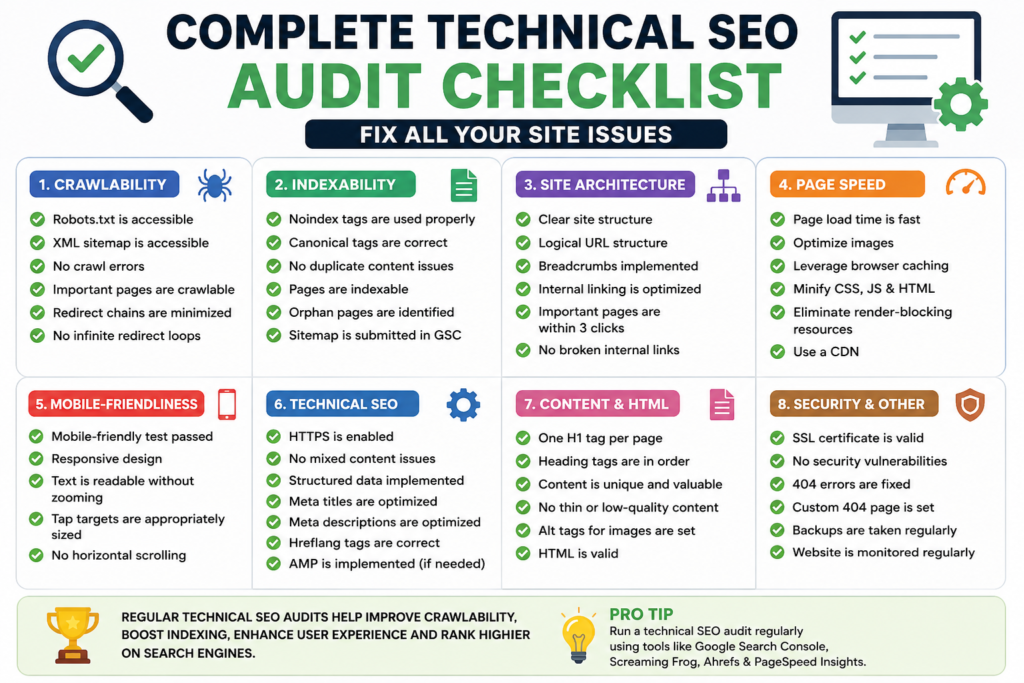
Use this checklist section by section. Work through it top to bottom and tick each item as you go.
1. Crawlability and Robots.txt
The first thing to check is whether Google can actually access your website.
- Open your robots.txt file at yourdomain.com/robots.txt
- Make sure it is not blocking important pages, CSS files, or JavaScript
- Check that your key service pages, blog posts, and category pages are all accessible to Googlebot
- Use Google Search Console > Settings > Robots.txt Tester to validate
A common mistake small businesses make is accidentally blocking their own homepage or product pages. This single error can completely kill your rankings.
2. XML Sitemap Health
Your sitemap tells Google which pages to prioritize.
- Submit your sitemap in Google Search Console under Sitemaps
- Make sure it only contains canonical, indexable URLs
- Remove any 301 redirected URLs, 404 pages, or noindex pages from the sitemap
- Check that your sitemap updates automatically when you publish new content
For WordPress sites, plugins like Yoast SEO or Rank Math handle this automatically. For custom-built sites, you may need to set this up manually.
3. Index Coverage Check
Being crawled is not the same as being indexed. Google may crawl your page and still decide not to include it in search results.
- Go to Google Search Console > Index > Pages
- Review any URLs marked as Excluded, Discovered but not Indexed, or Crawled but not Indexed
- Fix pages that are accidentally noindexed by checking their meta robots tag
- Prioritize pages that are generating no impressions but should be
The “Discovered but not indexed” status is increasingly common in 2025 and often means Google does not find your page important enough. The solution is improving internal linking to that page and strengthening its content quality.
4. HTTPS and Site Security
This is non-negotiable in 2025.
- Confirm your site runs fully on HTTPS, not HTTP
- Check your SSL certificate is valid and not expired
- Use a browser tool or SSL checker to look for mixed content warnings (where some images or scripts still load over HTTP)
- Ensure all HTTP versions redirect properly to HTTPS
For healthcare providers, educational institutions, and eCommerce brands collecting user data, HTTPS is both an SEO requirement and a legal and trust signal.
5. URL Structure and Site Architecture
Clean URLs and logical structure help both users and search engines understand your site.
- URLs should be short, descriptive, and keyword-relevant
- Avoid dynamic URLs with session IDs or excessive parameters like ?id=12345&ref=abc
- Important pages should be reachable within three clicks from the homepage
- Avoid deep nesting like /category/subcategory/sub-subcategory/page/
For eCommerce brands with large product catalogs, this is especially important. A flat architecture keeps your crawl budget focused on your most valuable pages.
6. Page Speed and Core Web Vitals
Google uses Core Web Vitals as a direct ranking factor. This is one of the most impactful areas to fix website SEO issues quickly.
The three metrics to focus on are:
- LCP (Largest Contentful Paint): Should be under 2.5 seconds. Usually caused by large unoptimized images.
- INP (Interaction to Next Paint): Should be under 200 milliseconds. Affected by heavy JavaScript.
- CLS (Cumulative Layout Shift): Should be under 0.1. Caused by elements moving as the page loads.
To improve these scores, compress and convert images to WebP format, defer non-critical JavaScript, use a CDN, and enable browser caching. For a deeper dive into this area, read the guide on page speed optimization and technical wins that drive rankings.
7. Mobile Friendliness
Google indexes your mobile version first. If your mobile experience is broken, your rankings will suffer regardless of how well your desktop site performs.
- Run your site through Google’s Mobile-Friendly Test tool
- Check that text is readable without zooming
- Ensure buttons and links have enough tap space (minimum 48×48 pixels)
- Eliminate horizontal scrolling on small screens
- Test on multiple real devices, not just emulators
For local businesses in Kochi where mobile search dominates, this is especially critical. Most “near me” searches happen on mobile.
8. Broken Links and Redirect Chains
Broken links damage user experience and waste your crawl budget.
- Use Screaming Frog or Ahrefs to crawl your site and identify all 404 errors
- Fix broken internal links by updating the URL or setting up a 301 redirect
- Check for redirect chains where URL A redirects to URL B which redirects to URL C
- Google recommends keeping redirects to a single hop
Every broken link is a dead end for both users and search engine bots. For a site with hundreds of pages, this step alone can uncover dozens of fixable issues.
9. Canonical Tags
Duplicate content splits your ranking signals and confuses search engines.
- Every page should have a self-referencing canonical tag
- eCommerce product pages with filters or sorting parameters should canonical back to the main product URL
- Check that canonical tags are not pointing to noindexed pages or incorrect URLs
- Ensure the canonical version is also the one in your sitemap
A common mistake is having your CMS generate canonical tags automatically but pointing them to the wrong page, especially when URL parameters are involved.
10. Duplicate Content
Beyond canonical tags, actively check for duplicate content across your site.
- Use Siteliner to find pages with high percentage of duplicate or near-duplicate content
- Common sources include printer-friendly versions, tag and archive pages, and similar product descriptions
- Resolve duplicates by consolidating content, setting canonical tags, or rewriting pages to be unique
For blogs and content-heavy websites, thin or duplicated pages can drag down your entire domain’s authority in Google’s eyes.
11. Internal Linking Structure
Internal links are one of the most underused SEO tools available to you.
- Make sure every important page on your site has at least 3 to 5 internal links pointing to it
- Use descriptive anchor text that includes relevant keywords naturally
- Avoid orphan pages — pages with no internal links pointing to them
- Build topical clusters by linking related content together
For example, this article links naturally to the local SEO expert in Kochi service page and the AI-powered search optimization blog because both are topically related to improving your site’s search performance.
Internal linking is also one of the fastest ways to push PageRank to underperforming pages without building any new backlinks.
12. Schema Markup and Structured Data
Schema markup helps Google understand your content and can earn you rich results in search — star ratings, FAQs, events, and more.
- Use Google’s Rich Results Test to check what structured data your site already has
- Add LocalBusiness schema with your name, address, and phone number for any Kochi-based business
- Add Product and Review schema for eCommerce pages
- Use FAQ schema on service pages and blog posts to improve your chances of appearing in People Also Ask boxes
- For healthcare providers, use MedicalOrganization schema
Structured data also plays an increasingly important role in answer engine optimization, helping AI-powered search tools like ChatGPT and Perplexity cite your content accurately.
13. Meta Tags Audit
Missing or duplicate meta tags are among the most common and easily fixable technical SEO issues.
- Every page must have a unique title tag under 60 characters that includes the primary keyword
- Every page must have a unique meta description between 150 and 160 characters
- Check for pages with missing, duplicate, or truncated titles using Google Search Console or Screaming Frog
- Avoid keyword stuffing in title tags — write for humans first
Meta tags are often the first thing users see in search results. A well-written title and description directly influences your click-through rate, which also affects your rankings.
14. Image Optimization
Images are often the biggest contributor to slow page speeds and missed SEO opportunities.
- Compress all images using tools like Squoosh or ShortPixel
- Convert to next-gen formats like WebP or AVIF
- Add descriptive alt text to every image using relevant keywords naturally
- Add width and height attributes to prevent layout shift (CLS)
- Use lazy loading for images below the fold
Alt text also helps with image search rankings and accessibility for visually impaired users — both of which are becoming more important under Google’s E-E-A-T framework.
15. Crawl Budget Management (For Larger Sites)
If your site has hundreds or thousands of pages, crawl budget starts to matter significantly.
- Block low-value pages from being crawled via robots.txt — this includes login pages, filtered search result pages, and thank-you pages
- Analyze server log files to see which pages Googlebot spends the most time on
- Make sure your crawl budget is being spent on your high-priority service, product, and landing pages
- Reduce redirect chains and fix broken links to reduce wasted crawl cycles
For eCommerce brands, educational portals, and multi-location businesses, ignoring crawl budget is one of the most expensive technical SEO mistakes possible.
E-E-A-T Signals to Strengthen Alongside Your Technical Audit
Google’s quality guidelines evaluate content on Experience, Expertise, Authoritativeness, and Trustworthiness. Technical SEO and E-E-A-T work together — your technical setup must support your credibility signals.
Here is what to check:
- Is your author bio visible on all blog posts with real credentials?
- Does your site have a clear About page, Contact page, and physical address?
- Are your NAP details (name, address, phone) consistent across your website and Google Business Profile?
- Do you have positive reviews on Google and third-party platforms?
- Is your content regularly updated to reflect current information?
For businesses using local SEO strategies in Kochi, E-E-A-T signals tied to your location — like local reviews, local citations, and a verified Google Business Profile — directly impact your local pack rankings.
Technical SEO Audit Tools You Need
You do not need to spend a fortune to run a thorough audit. Here are the essential tools:
- Google Search Console — Free. The most important tool. Shows crawl errors, index coverage, Core Web Vitals, and search performance.
- Google PageSpeed Insights — Free. Tests your Core Web Vitals with real user data.
- Screaming Frog SEO Spider — Free up to 500 URLs. Crawls your entire site and surfaces broken links, duplicate tags, missing metadata, and more.
- Ahrefs or SEMrush — Paid. Comprehensive site audits, backlink data, and keyword tracking.
- Siteliner — Free. Finds duplicate content across your site.
- Google’s Rich Results Test — Free. Validates your structured data.
For most small businesses and startups in Kochi, combining Google Search Console with Screaming Frog will surface 80 percent of the issues on this checklist.
How Often Should You Run a Technical SEO Audit?
- Small businesses and startups: Every 6 months
- eCommerce brands with active inventory: Every 3 months
- Enterprise and high-traffic sites: Monthly crawls with ongoing GSC monitoring
Set a recurring reminder. The sites that rank consistently are the ones that treat technical SEO as an ongoing discipline, not a one-time fix.
Frequently Asked Questions
What is the most important part of a technical SEO audit?
Crawlability and indexability come first. If Google cannot crawl and index your pages, nothing else matters. Start with Google Search Console and check for crawl errors and index coverage issues before anything else.
How long does a technical SEO audit take?
For a small business site with under 100 pages, a thorough audit using this checklist takes two to four hours. For larger sites, you may need a full day or more. Running automated tools like Screaming Frog dramatically speeds up the process.
Can I do a technical SEO audit myself or do I need an expert?
You can absolutely work through this checklist yourself. Many issues — like fixing meta tags, submitting a sitemap, or resolving redirect chains — require no coding knowledge. However, for complex issues like JavaScript rendering problems, hreflang errors, or crawl budget optimization, working with an experienced SEO expert in Kochi will save you significant time and avoid costly mistakes.
What tools do I need for a technical SEO audit?
Google Search Console and Screaming Frog cover the majority of issues for free. Add Google PageSpeed Insights for Core Web Vitals and Siteliner for duplicate content. For a complete picture including backlinks and competitor benchmarking, Ahrefs or SEMrush are worth the investment.
How does technical SEO affect local SEO rankings in Kochi?
Technical SEO is the foundation that local SEO is built on. If your site is slow, has crawl errors, or lacks schema markup, your Google Business Profile and local citations cannot perform at their best. Fixing your technical issues first makes every other local SEO effort more effective.
Conclusion: Fix the Foundation First
Rankings are built on foundations. And the foundation is always technical.
A complete technical SEO audit checklist like this one gives you a clear, structured path from identifying issues to fixing them — without guessing, without fluff, and without wasting time on things that do not move the needle.
Work through each section in order. Prioritize crawlability and indexing first, then speed, then structure, then schema. Each fix you make builds compounding momentum. Over time, the results show up exactly where they matter: on Google’s first page.
If you want to go further, explore how AI-powered search optimization is changing the way websites need to be built and how answer engine optimization can help your content get cited by AI tools like ChatGPT and Perplexity.